


On some SonicWall firewalls running older versions of SonicOS, you may encounter issues establishing an SSH session from Auvik or another SSH client.
Symptoms
You may observe one or more of the following:
- A remote terminal session launched from Auvik fails to connect.
- SSH access from a third-party client (such as PuTTY) fails.
- The firewall reports that the SSH connection is already in use.
- Only one management session can be established at a time from different source IP addresses.
This behavior has been observed on older SonicWall platforms, including the NSA 2400 series running SonicOS 5.8 and later.
Cause
Although these devices support multiple management sessions, some SonicOS versions may restrict concurrent SSH connections from different source IP addresses.
In some cases, an existing SSH session remains active after the administrator has disconnected. When this occurs, the firewall may prevent new SSH connections from being established until the original session is cleared or times out.
Because Auvik establishes SSH sessions from the collector, a stale SSH connection can prevent Auvik from opening a new terminal session.
Resolution
Clear the existing SSH connection from the SonicWall firewall.
Step 1: Log In to the SonicWall Management Interface
Access the SonicWall management interface using one of the following methods:
- Open a web browser and navigate directly to the firewall's IP address.
- From Auvik, open the device details page and select Remote Manage > Remote Browser.
Step 2: Open the Diagnostics Page
Navigate to:
System > Diagnostics
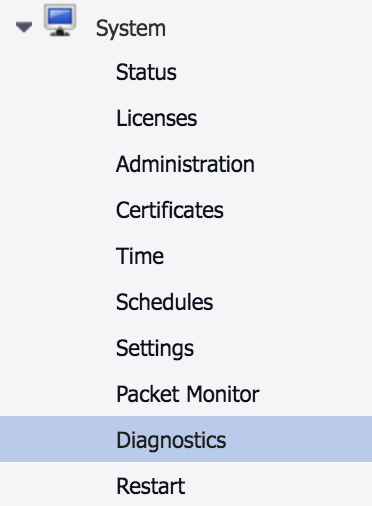
Step 3: View Active Connections
From the Diagnostics Tool drop-down menu, select:
Connection Monitor

Locate any active connections where the Flow Type is listed as SSH.
Step 4: Flush the Existing SSH Session
Click Flush next to the SSH session.
The existing SSH connection is terminated, allowing a new SSH session to be established.
Additional Troubleshooting
If SSH access still fails after flushing the connection:
- Verify that SSH management access is enabled on the firewall.
- Confirm that the source IP address is permitted to connect.
- Check for access rules restricting management traffic.
- Verify that the firewall is running a supported SonicOS version.
- Allow several minutes for stale sessions to time out naturally and try again.
If the issue persists, test SSH connectivity directly from the Auvik collector or another management workstation to determine whether the issue is specific to Auvik or affects all SSH clients.
Related Information
This issue is most commonly encountered on older SonicWall platforms and firmware releases. Newer SonicOS versions generally provide improved SSH session handling and may not exhibit the same behavior.